
Agent Teams or: How I Learned to Stop Worrying About Merge Conflicts and Love Git Worktrees

Written by
February 12, 2026
|
Approximately a 00 minutes read
Development
I hope you have a lot of tokens.
I've been having a lot of fun with Claude Code lately and although it helps me create cool stuff quickly, I often find myself just twiddling my thumbs waiting for Claude to finish his work and allowing tool-calls here and there.
That doesn't feel quite right so I have decided to do something about it.
Instead of twiddling my thumbs watching over a single session, I can now do so while watching over multiple, in parallel!
Just as I started writing this article Anthropic released Agent Teams for Claude Code, which based on my limited testing seems to pair really well with worktrees so I will be including some notes on that as well.
What are Git Worktrees?
The focus of this article is not to give a deep dive on git worktrees so I will try to keep this section brief.
Basically it lets you branch out your repo to a custom path.
Say you have your git repo cloned to ~/code/my-repo and you are on the main branch:
$ git status
On branch main
The most common way to start working on a feature is by branching out with git checkout -b feat/feature-1 and start editing.
If you want to work in parallel with this approach however you would need to clone your repo to a new path like ~/code/my-repo-2 and branch out again with git checkout -b feat/feature-2. It works but it's quite cumbersome.
With worktrees this is much easier. Instead of using git checkout you can instead run git worktree add like this:
$ git worktree add .worktrees/feature-1 -b feat/feature-1
Preparing worktree (new branch 'feat/feature-1')
HEAD is now at d6c5908 feat: initial commit
And you can continue doing this for feature-2, feature-3 and so on.
I like using a directory like .worktrees/ inside the repository to keep things tidy. Note that when doing this it's important to add an entry to the .gitignore file:
echo ".worktrees/" >> .gitignoreTo get an overview of all your worktrees you can run git worktree list from the repo root:
$ git worktree list
~/code/my-repo                       f47f01f [main]
~/code/my-repo/.worktrees/feature-1  1b2ca5c [feat/feature-1]
~/code/my-repo/.worktrees/feature-2  9fdb83a [feat/feature-2]
To start "using" a worktree you can simply cd into the directory:
$ cd .worktrees/feature-1
$ git status
On branch feat/feature-1
nothing to commit, working tree clean
Here you can commit and push like you normally would on any other branch.
Finally, you can remove the worktree with git remove worktree (this has autocompletion!)
$ git worktree remove .worktrees/feature-1What are Agent Teams?
Agent Teams is a feature in Claude Code that allows one session of claude to start other sessions of claude that effectively work together as a team to solve problems.
These are different from subagents which simply lets claude explore multiple files in your repo simultaneously (among other things).
Agent Team sessions are actual Claude sessions that the user can interact with the same way they usually would, although most interactions will go through the team lead "main" session.
One of the examples mentioned in the documentation is a team consisting of:
- A team lead that delegates the tasks (this is the Claude session you started)
- One teammate focusing on UX
- One on technical architecture
- And one playing devil's advocate
It is also possible to specify the model to use for each teammate.
There's a lot more to it than this so I highly recommend reading the docs or giving it a spin for yourself.
Basic Workflow
This is based on my own personal experience with Claude Code specifically, but the same basic workflow should apply to any agent based coding tool.
Standard
When not using Agent Teams I will usually do this:
- Start Claude on the main branch in a new shell.
- Describe your feature and include instructions to use git worktrees
- This can optionally be added to CLAUDE.md so you don't have to specify every time
- Repeat first two steps for every feature
- Twiddle your thumbs
- When all features are ready and PRs are made, start a new Claude session and instruct it to merge PRs in the optimal order.
- See "Merge Conflict" section below
Team-based
With Agent Teams you could instead do it like this:
- Start Claude on the main branch in the first shell.
- Construct your prompt:
- Set up the team
- Describe feature 1
- Describe feature 2
- Include instructions to use git worktrees
Create a team with two teammates to work on these two features in parallel with git worktrees:

Feature 1: OpenAPI documenation
The site should include an interactive (or at least nicely rendered) documentation page
for the API using the OpenAPI spec.
Ensure this teammate creates a plan before working.
Use Opus 4.6

Feature 2: Animation on external documentation redirect
When pressing the "Documentation" sidebar nav button, the current behaviour is to show
nothing on the page.
There should be some animation in the middle of the page indicating that you are being redirected.
Ensure this teammate creates a plan before working, exploring the implementation from a
technical perspective and from a ux perspective.
Use Sonnet 4.5

Separate git worktrees must be created for each feature under `.worktrees/`- Wait for work to complete
- When all features are ready and PRs are made simply tell the team lead to coordinate merging.
This probably works best for less complex tasks and bugfixes and so on, but some of the benefits here are that you have the team lead that can coordinate from above and that you don't have to juggle Claude sessions yourself.
For more complex tasks it is probably better to just follow the original workflow and start a team inside each worktree.
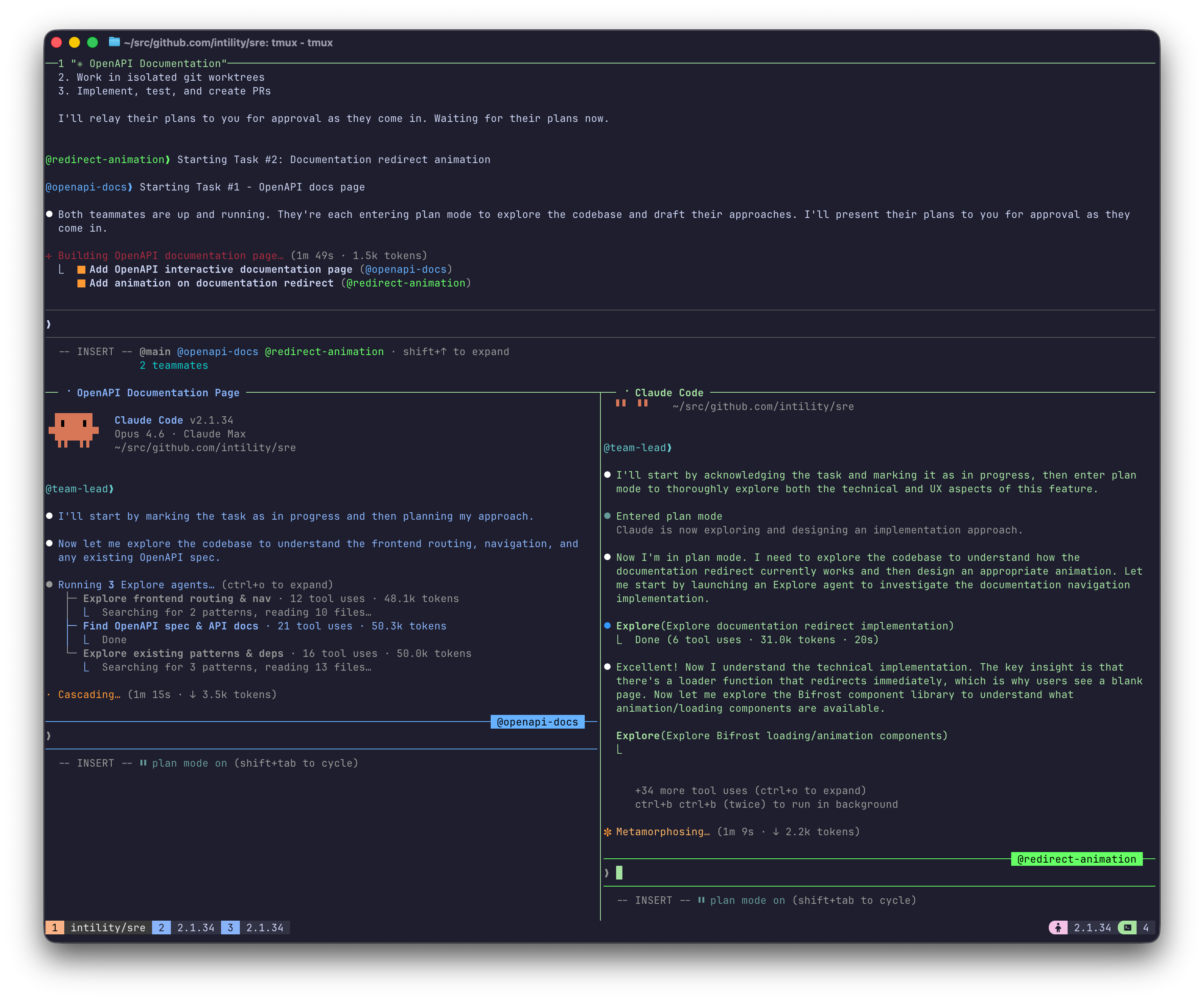
A team of two agents working on different features
Use a Session Manager
I really recommend using a session manager when doing this.
Personally I've always used tmux (you can find my dotfiles here by the way) which is also one of the supported display modes for agent teams.
You could also just use different tabs or windows in your terminal as Claude is quite good at resuming sessions if you should happen to close your shell.
Set up .gitignore
As mentioned above, because we will be adding our worktrees to the .worktrees/ directory inside of our repo it must be added to the .gitignore file.
.worktrees/Not doing this will make a big mess.
It is also entirely possible to create the worktrees outside the repo directory but I personally find that hard to keep track of.
Give the right instructions
You need to be pretty explicit with Claude about the use of Git Worktrees.
Using a set of Agent Skills like obra/superpowers helps but something like this should probably be added to CLAUDE.md for good measure:
## Git Worktree Workflow

**All feature work MUST happen in git worktrees.** Never make code changes directly in the repo root or on the `main` branch
unless the user explicitly instructs otherwise.

- **Worktree directory:** `.worktrees/` (already gitignored)
- **Creating a worktree:** Run `git worktree add .worktrees/<branch-name> -b <branch-name>` from the repo root, then `cd` into it and install dependencies
- **Completing work:** Commit, push, and create a PR from the worktree branch. After merging, clean up with `git worktree remove .worktrees/<branch-name>` and `git branch -d <branch-name>`
- **Exceptions:** Only skip worktrees when the user explicitly asks to work directly on `main`
Adjust to your liking, you might not always want to use worktrees and you might want to give more detailed instructions on how to run the project in different worktrees without having conflicting ports and the like.
Merge Conflicts
You might be thinking that this is bound to result in merge conflicts.
It does.
Thankfully Claude is quite good at handling them so no need to worry.
What I usually do is to feed Claude a prompt like this in a fresh session:
I have two pull requests open (#213 and #215) that were developed in parallel
Both feature branches exist in this repository locally as git worktrees under `.worktrees/`
Inspect both PRs using the `gh` cli and find the optimal order to merge them
Fix any merge conflicts that might appear
If you have a lot of open PRs you could also make a team of reviewers with a teammate per PR with the team lead coordinating merge order and what blocks what etc, although this might be a bit overkill.
I can imagine this being useful if you want to mix in some actual code or security review when coordinating the merges.
Create a team of reviewers to examine and merge the following PRs in the optimal order:
#220, #221, #222, #223, #224
These PRs are all available locally as git worktrees in this repo under `.worktrees/`
Use one teammate per PR, the lead should coordinate merge order and resolution of merge conflicts.
Running parallel code review is also one of the suggested uses of agent teams in the documentation.
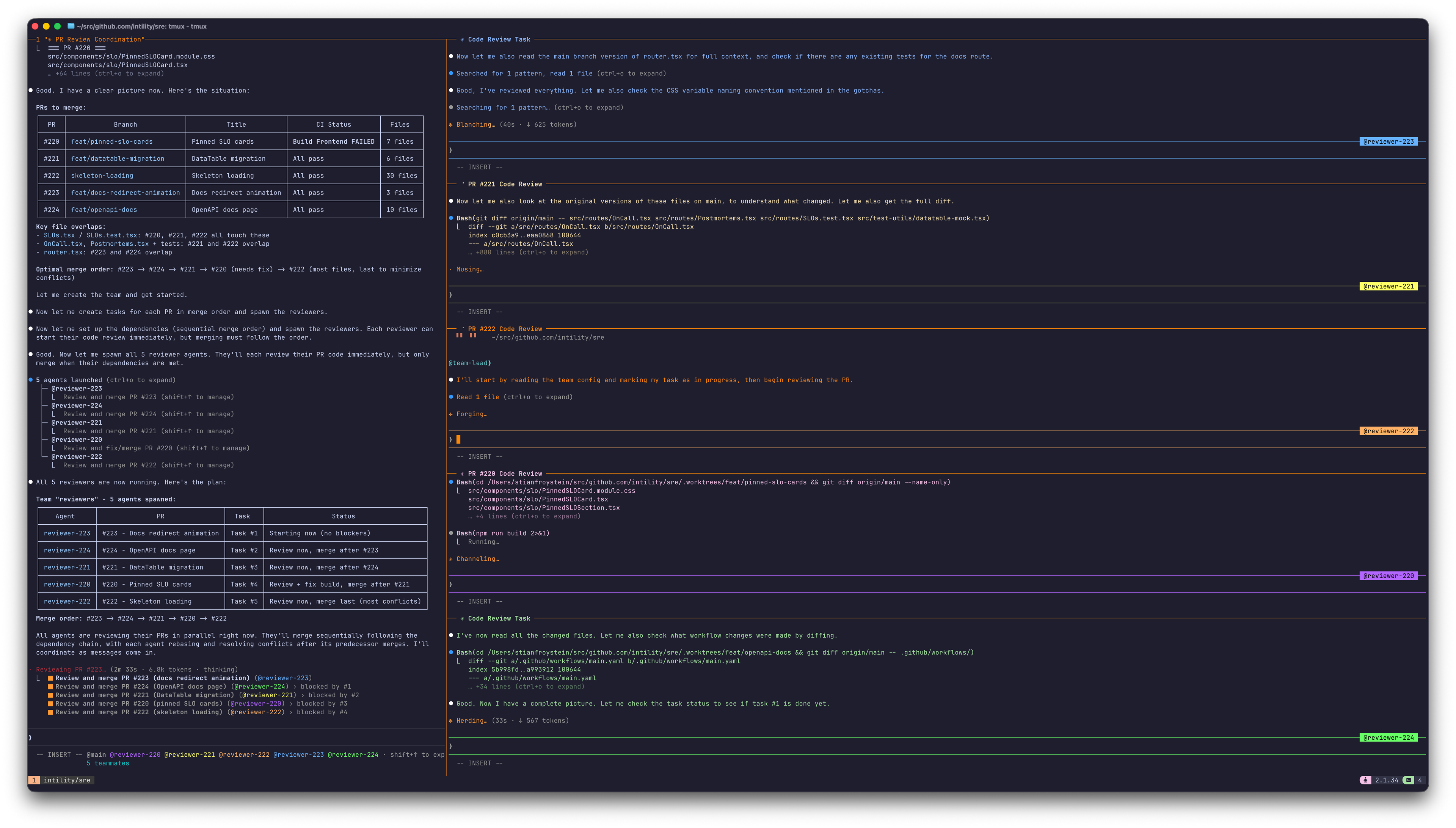
A team of five agents each reviewing their own assigned PR
Other gotchas
Claude Sandboxing doesn't seem to work that well when using git worktree, or at least not when having Claude create them directly. So either you live with it, disable sandbox or give even clearer instructions on how to handle worktrees when in sandbox.
Compacting context can at times be a bit buggy when running a team, requiring canceling running tasks of all teammates before triggering the compact from the team lead. This might just be an Opus 4.6 problem (or a me problem) and I'm sure it will get better.
Another bug I encountered when using agent teams was that enabling auto-accepting file edits sometimes did not "stick", requiring me to allow every single tool call of every teammate.
Conclusion
That's how I've been using git worktrees and agent teams to work with Claude Code in parallel.
I'm sure there are even better ways of doing this, but there you have it.
Until next time!
if (wantUpdates == true) {followIntilityOnLinkedIn();}