
Making Our Website AI-Friendly

Written by
August 4, 2026
|
Approximately a 00 minutes read
Development
With the continued rise of AI, more and more people use AI agents to browse and search the internet. What this means for us as a company is that we need to make it easy for AI agents to understand us.
AI SEO, AEO, GEO. The concept of making content easy to find, read and understand for AI agents goes by many names. In this article I will mainly refer to it as AI-friendliness. Our goal is that AI agents exploring our website in search of information have an easy time doing so. While a HTML-rendered React-website looks nice and cohesive for us when we browse the web with our browsers, agents quickly drown in the raw HTML-soup that a typical, modern webpage is built up of, and information may quickly be lost.
The Problem
When browsing the web for humans, agents don't see the website the same way we do. While we may see a heading section with a floating badge and some body text and maybe an image, an agent only sees a nested HTML-structure, with a lot of unnecessary syntax. Let's take a look at this section from our homepage as an example:
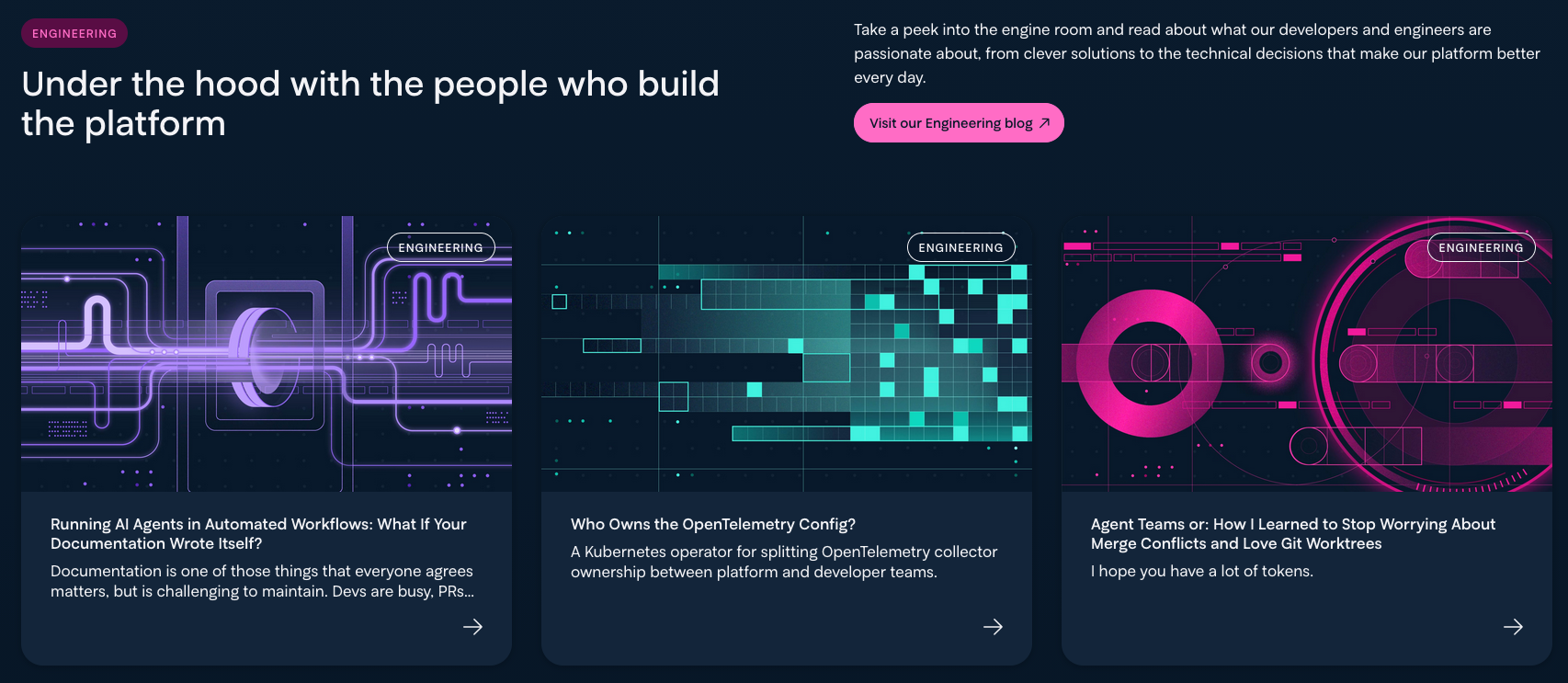
A section on Intility.com featuring articles from this blog
When viewing it visually, the information is presented to us in a clear and concise manner. However, in raw HTML it looks like this:
<div class="HorizontalContent_content__PN6w3" style="--textColor: var(--lightGrey)">
  <div class="HorizontalContent_intro__43Q4T">
    <div
      class="Tag_tag__0hdJc Tag_duo__4G_t2"
      style="--mainColor: #ff6cc5; --fadeColor: #590d44; --textColor: var(--darkBlue)"
    >
      <span>Engineering</span>
    </div>
    <h2
      class="HorizontalContent_title__Q1N1z"
      aria-label="Under the hood with the people who build the platform"
    >
      <span class="Title_plainTitle__fr5Q4" style="--textColor: var(--lightGrey)"
        >Under the hood with the people who build the platform</span
      >
    </h2>
  </div>
  <div class="HorizontalContent_textWrapper__41PJ_">
    <div class="HorizontalContent_text__vaWck">
      <div class="CustomLexicalSerializer_rtWrapper__JN1fg" id="article-content">
        <p>
          <span class="ParagraphSerializer_regulartext__tpmis"
            >Take a peek into the engine room and read about what our developers and engineers are
            passionate about, from clever solutions to the technical decisions that make our
            platform better every day.</span
          >
        </p>
      </div>
    </div>
    <a
      class="Button_wrapper__8iWDy undefined"
      style="
        --color: #ff6cc5;
        --btn-bg: #ff6cc5;
        --btn-bg-hover: #ff8cd2;
        --btn-color: var(--darkBlue);
        --btn-border: #ff6cc5;
        --btn-border-hover: #ff8cd2;
      "
      target="_blank"
      rel="noopener noreferrer"
      aria-label="Visit our Engineering blog (opens in new tab)"
      href="https://engineering.intility.com/"
      ><div class="Button_content__VWe0H undefined">
        <span>Visit our Engineering blog</span
        ><span class="Button_icon__Gil2P"
          ><svg
            class="svg-inline--fa fa-arrow-up-right FAIcon_faIcon__wfOqs"
            data-prefix="far"
            data-icon="arrow-up-right"
            role="img"
            viewBox="0 0 384 512"
            aria-hidden="true"
            data-fa-i2svg=""
          >
            <path
              fill="currentColor"
              d="M360 64c13.3 0 24 10.7 24 24l0 240c0 13.3-10.7 24-24 24s-24-10.7-24-24l0-182.1-295 295c-9.4 9.4-24.6 9.4-33.9 0S-2.3 416.4 7 407l295-295-182.1 0c-13.3 0-24-10.7-24-24s10.7-24 24-24l240 0z"
            ></path></svg
        ></span></div
    ></a>
  </div>
</div>
That's a lot of unnecessary text for an agent to read, and the actual content can quickly get lost in all the HTML syntax surrounding it.
The Solution
We want to present agents with just the info they need: the actual content on the website. Agents operate mostly in Markdown, a lightweight markup language. Our goal was to deliver separate markdown-versions of all pages on our website. For instance, humans can read about Intility's sustainability approach on our /sustainability page, while agents can get just the content from that page at /sustainability.md. Simply appending .md to any route on intility.com gives you a markdown version of that route.
Delivering the Same Content Twice
Managing two sets of identical content on a website can sound very tedious and prone to errors. Luckily for us, we have built our website using Payload as a CMS/page builder solution, and we can easily reuse the content that already exists there and present it to agents in another format.
The Intility website is fully built by designers creating pages and assembling layouts inside the admin dashboard. The frontend itself only has one singular page.tsx dynamic route that acts as a catch-all for any valid, existing slug in the CMS. This means that all the data on the website, ranging from hero sections to CTAs to open positions, exist in the CMS.
The biggest part of making our website AI-friendly was to build a new set of serializers/transformers. Our existing serializer read the page layout field, and rendered each section in order as JSX-components. For our markdown pages we need to render the layout fields as markdown instead,
{...}
switch (block.blockType) {
    case 'hero':
      return mdHero(block);
    case 'articles':
      return mdArticles(block);
    case 'cards':
      return mdCards(block);
    case 'heading':
      return mdHeading(block);
{...}
That is basically it for the content part of it. The editors never have to write markdown manually in the CMS, they just build the pages like they normally would and the CMS automatically transforms the content into markdown for them.
Guiding the Bots
We are now effectively delivering the same page twice, just in different formats. It's important that the correct page is served to the correct audience. The designers that have worked many hours to make our website look good would be pretty bummed out if our visitors got served the Markdown pages instead.
Accessing the Markdown Page
If you are a human, you can simply append .md to the end of an URL on our website, and you'll get the markdown version. This is handled by our Next.js proxy.ts (previously named middleware), which checks if any incoming request either ends with the .md suffix, or if the request headers include accept: text/markdown. If any of those are true, the request gets forwarded to an API-route at api/md which checks the slug, finds the correct page, and passes that page content to the markdown serializer.
That is fine and dandy if the agent searching our website is using the accept: text/markdown header, but we can't know that for sure. Different sources say different things, and Claude claims it's not using it. Since we don't want agents to read our HTML-versions if possible, our proxy also appends an HTTP Link header for all responses: Link: </path.md>; rel="alternate"; type="text/markdown". This allows an agent to see that we serve a markdown version without having to parse the document body first.
We also set the Vary: Accept header so the cached responses for say /sustainability are cached differently based on if the visitor got served HTML or markdown. In short, the same URL can provide two different responses based on content negotiation, so we need to tell the cache mechanism that the response for the URL depends on the Accept request header.
LLMS.txt
We also host a llms.txt on our website to act as a landing page for AI agents. We have changed all the links here to use the .md suffix, so that an agent landing here and following links automatically get markdown versions. Internal links on a markdown version of a page also get this treatment. Our /news.md for instance links to /article-slug.md for all the articles it lists.
Some Gotchas
On the response headers, we also add X-Robots-Tag: none to avoid getting these markdown pages crawled and indexed by search robots. We don't want to pollute our SEO with identical, markdown-only versions that are only meant for AI-agents to read.
If you are using Cloudflare, you should be aware that they don't honor Vary: Accept at all on any of their plans. The only Vary header they honor is Accept-Encoding. We still set it because it's correct HTTP, and it signals for any new developers looking at the code that there is content negotiation in place. We just can't rely on Cloudflare to enforce it, which is why we don't enable edge caching on the negotiated routes.
Conclusion
Measuring the result of these markdown pages is a bit tricky because they never execute any code, they just present raw text as Markdown. It's hard to say if this endeavor will be a success or not, but we hope it makes our website easier for agents to understand. It should at least save them quite a lot of tokens when reading our website. For our homepage, the size went down from ~643 KB HTML to ~8 KB markdown.
Even though AI has been around for a while now, it still feels like we're in the early days – especially regarding making websites easier to read and use for AI agents. If you know any tips we could use in addition to what I've talked about in this article, feel free to share them with us!
if (wantUpdates == true) {followIntilityOnLinkedIn();}
Other Articles







Platform
June 26, 2026
Beyond Intelligence: Benchmarking Speed and Cost of Self-Hosted vs. Frontier LLMs

Erfan Mohammadi